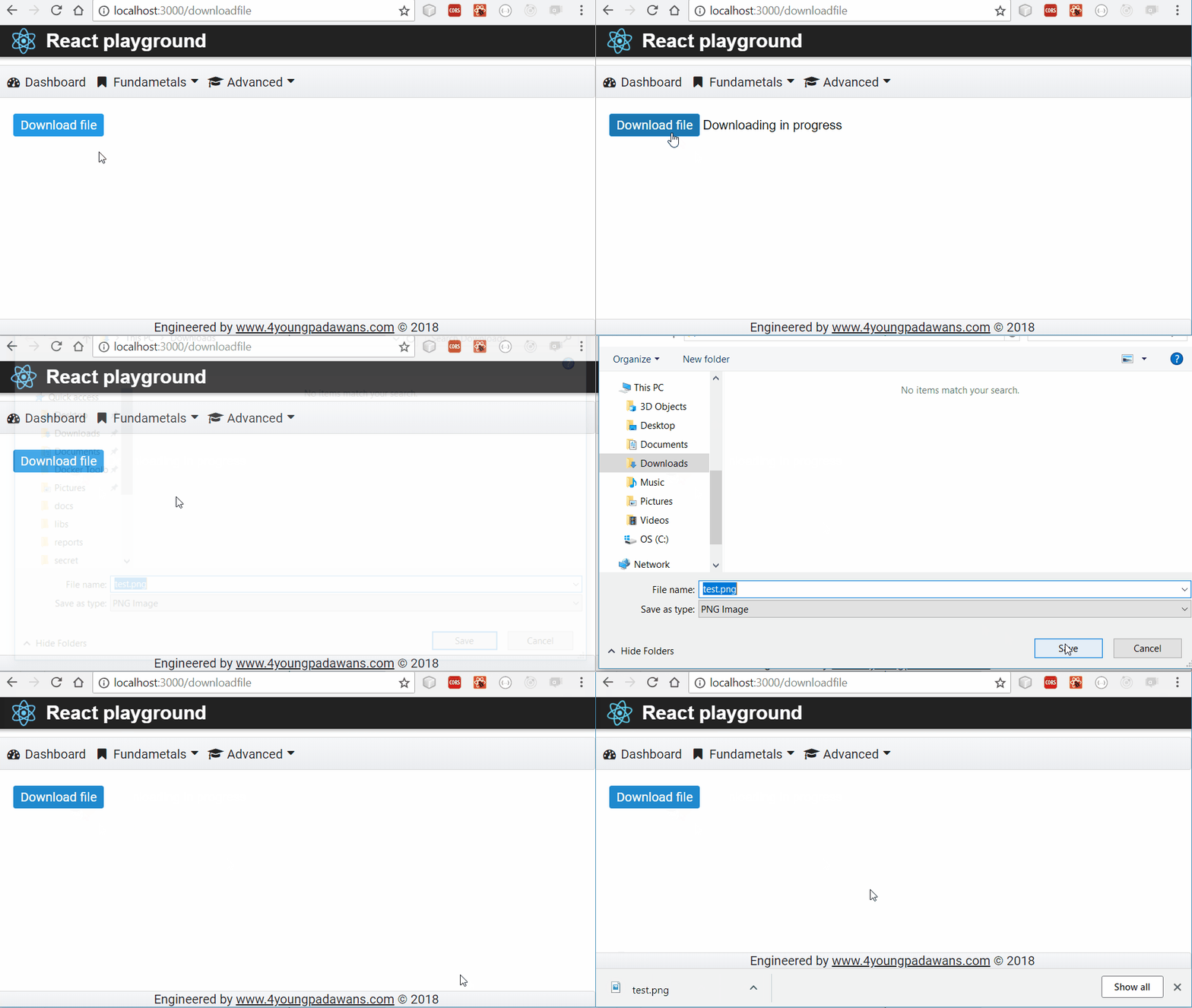

Recently I was asigned with a task to implement downloading file from server to client machine using web browser. I've encountered on few specifics described below.
Basics
- Client side logic have to send HTTP GET request to remote server IP address with requesting file with a certain name.
- Server side logic should accept HTTP GET request and
- read file from local file system and put it in response body,
- set Content-Disposition HTTP header to attachment informing client how downloaded file should be treated.
- inform browser that it is allowed to read additional headers from response by setting Access-Control-Expose-Headers HTTP header or otherwise browser will not be able to read Content-Disposion and Content-Lenght headers due to browser inbuilt security.
Server side - Spring
Let's create Spring controller and one endpoint capable to accept client's HTTP GET request and serve the requested file.
@Controller
@RequestMapping(path = "/files")
public class FileController {

    @Autowired
    private ApplicationContext applicationContext;

    @GetMapping("/{filename:.+}")
    @ResponseBody
    public ResponseEntity<Resource> serveFile(@PathVariable String filename) {
        Resource file = applicationContext.getResource("file:C:/test/" + filename);
        if (file.exists()) {
            HttpHeaders headers=new HttpHeaders();
            //instructing web browser how to treat downloaded file
            headers.add(HttpHeaders.CONTENT_DISPOSITION,"attachment; filename=\\\\"" + file.getFilename() + "\\\\"");
            //allowing web browser to read additional headers from response
            headers.add("Access-Control-Expose-Headers",HttpHeaders.CONTENT_DISPOSITION + "," + HttpHeaders.CONTENT_LENGTH);
            //put headers and file within response body
            return ResponseEntity.ok().headers(headers).body(file);
        }
        //in case requested file does not exists
        return ResponseEntity.notFound().build();
    }
}
Client side - React
Step 1
Supposing you've already created React project, now create service.jsx file to setup basic client HTTP connection parameters
import axios from 'axios';
class Service {
  getRestClient() {
    if (!this.serviceInstance) {
      this.serviceInstance = axios.create({
        baseURL: 'http://localhost:8080/',
        timeout: 10000,
        headers: {
            'Content-Type': 'application/json'
          },
      });
    }
    return this.serviceInstance;
  }
}

export default (new Service());
where
- baseURL is URL of server,
- timeout is max timeout interval for axios server instance to establish connection with server. If server cannot be reached and this interval expires, axios will throw Timeout error exception.
- header 'Content-Type': 'application/json' will be sent within request informing server that client expects json formatted answer.
Note that service is implemented using Singleton pattern. It means that Service object instance will be unique: constructed only once and later reused for all calls.
axios javascript library is probably all you'll ever need if you intend to send HTTP requests from your web page.
Step 2
Create file-service.jsx file using new service to setup Java Script Promise object for file download request
import service from './service.jsx';

export class FileService {
    getFileFromServer(fileName){
        //returns Promise object
        return service.getRestClient().get('/files/'+fileName,{ responseType:"blob" });
    }
}
Note that we additionally instructed axios client to expect response type blob.
Step 3
Lets create React component for file downloading
import React, { Component } from 'react';
import { FileService } from '../services/file-service.jsx';
import { Button } from 'primereact/components/button/Button';
import { saveAs } from 'file-saver';

 export class DownloadFile extends Component {
    constructor() {
        super();
        this.fileService = new FileService();
        this.state={downloading:false};
    }

     extractFileName = (contentDispositionValue) => {
         var filename = "";
         if (contentDispositionValue && contentDispositionValue.indexOf('attachment') !== -1) {
             var filenameRegex = /filename[^;=\\
]*=((['"]).*?\\\\2|[^;\\
]*)/;
             var matches = filenameRegex.exec(contentDispositionValue);
             if (matches != null && matches[1]) {
                 filename = matches[1].replace(/['"]/g, '');
             }
         }
         return filename;
     }

    downloadFile = () => {
        this.setState({ downloading: true });
        let self = this;
        this.fileService.getFileFromServer("test.png").then((response) => {
            console.log("Response", response);
            this.setState({ downloading: false});
            //extract file name from Content-Disposition header
            var filename=this.extractFileName(response.headers['content-disposition']);
            console.log("File name",filename);
            //invoke 'Save As' dialog
            saveAs(response.data, filename);
        }).catch(function (error) {
            console.log(error);
            self.setState({ downloading: false });
            if (error.response) {
                console.log('Error', error.response.status);
            } else {
                console.log('Error', error.message);
            }
        });
    };

    render() {
        console.log("state",this.state);
        return (
            <div>
                <Button label="Download file" onClick={this.downloadFile} />
                <label>{this.state.downloading ? 'Downloading in progress' : ''}</label>
            </div>
        )
    };
}
In previous code we used file-saver package that has good cross-browser implemenation for file downloading.
Step 4
Now we only need to put new component inside React's top level component (App.js file)
import React, { Component } from 'react';
import {FileDownloader} from './components/fileDownloader.jsx';

export class App extends Component {
  render(){
    return (
      <div>
        <FileDownloader />
      </div>
    );
  }
}
Result