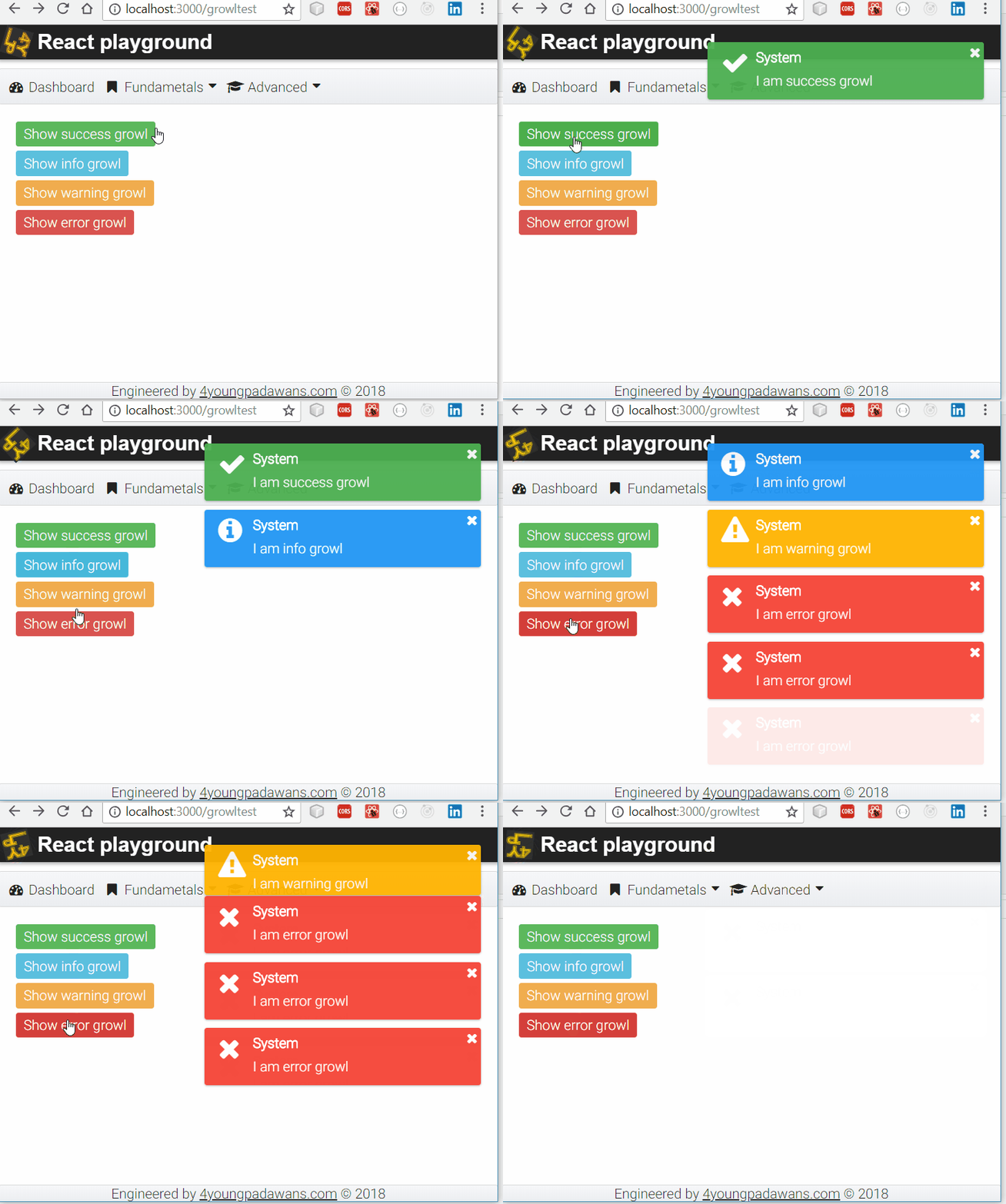

Growl is UI popup notification that contains information important for a user. Some operating systems have its own Growl API and also there is ongoing attempt to standardize HTML5 web notifications API. In this tutorial I will try to create practical example and explain how to create growl notification system for React SPA using PrimeReact Growl component and Redux bindings for React.
Primary goal
The primary goal of our efforts is:
- to design our app on such a way that there is only one occurrence of Growl component (global growl) inside app's root component
<App/>, - to provide mechanism that any UI or container component (regardless of where it is located in hierarchy of components) can show growl with single function call
Basics
Before going to next steps, lets suppose that you've already
- created React app,
- added PrimeReact components
- added Redux bindings for React to the project
In order to achieve our goal, we will need to implement following
- to define redux action that basically represents our intention to show growl notification,
- to create redux reducer that defines the way how our action changes app's state,
- to give ability to any component to dispatch redux action and change redux store (app's state),
- to create redux store and bind redux reducer(s) to it.
- to allow app's top level component (where we will place our growl component) to subscribe and listen on state changes caused by redux action.
- to intercept state changes, read growl information and, finally, show growl notification.
Redux action
We can start by creating redux action that should contain 2 fields
- action type - so that our logic can differentiate actions supposing show growl action will not be the only action in our app,
- action message - placeholder for growl details (e.g. growl title, details text,...)
actions/actions.jsx
//action type
export const SHOW_MESSAGE = 'SHOW_MESSAGE'

//action
export const showMessage = (message) => ({
  type: SHOW_MESSAGE,
  message:message
})

export function showGrowl(message) {
  return showMessage(message);
}
Redux reducer
Reducer should intercept our action (intent to show growl), take action's message property which carries growl details and change the state by pushing message into state's messages property.
reducers/message-reducer.js
import {SHOW_MESSAGE} from '../actions/actions.jsx';

const growlmessages = (state = {messages:[]}, action) => {
    switch (action.type) {
    case SHOW_MESSAGE:
        console.log('message-reducer action', action);
        let messages=[];
        messages.push(action.message);
        return {messages:messages};
    default:
        return state;
  }
}

export default growlmessages
Notice that I used ES6 syntax to define state's initial value:
state = {messages:[]}
Combine all reducers
Supposing that our real app will have more then one reducer, Redux provides handy way to combine all reducers.
reducers/reducers.js
import { combineReducers } from 'redux'
import growlmessages from './message-reducer.js'
//for example, lets suppose we have another action that triggers deletion of some items
import deleteitem from './deleteitem-reducer.js'

const appReducers = combineReducers({
  growlmessages,deleteitem
})

export default appReducers
Redux store
Redux store is object that holds entire app's state. It is unique for entire application. The only allowed way to change state is by dispatching an action.
Store is created by passing all app's reducers to it.
index.js
import React from 'react';
import ReactDOM from 'react-dom';
import App from './App';
import { Provider } from 'react-redux';
import { createStore } from 'redux'
import appReducers from './reducers/reducers.js'

//here we create store by passing all combined reducers
let store = createStore(appReducers);

const render = () =>
  ReactDOM.render(
    <Provider store={store}>
        <App/>
    </Provider>,
    document.getElementById('root')
  );

render();
<Provider/> is another Redux short hand that exposes store to all components inside top level <App/> and allows all components to be able to dispatch action or subscribe and listen to dispatched actions.
Dispatching redux actions
Now let's implement action creator: React component that will dispatch (trigger, create) an action with intent to show growl notification.
In following example, we will define 4 buttons and each of them will trigger different PrimeReact's growl type (success, info, warning, error)
primereact-growl.jsx
import React, { Component } from 'react';
import { connect } from 'react-redux'
import { showGrowl } from '../actions/actions.jsx'
import { showSuccessMessage } from '../utils/utils.js';
import { showInfoMessage } from '../utils/utils.js';
import { showWarningMessage } from '../utils/utils.js';
import { showErrorMessage } from '../utils/utils.js';
import { Button } from 'primereact/components/button/Button';

export class GrowlTest extends Component {
    constructor() {
        super();
    }

    onShowSuccessMessage = () => {
        showSuccessMessage(this, "System", "I am success growl");
    };

    onShowInfoMessage = () => {
        showInfoMessage(this, "System", "I am info growl");
    };

    onShowWarningMessage = () => {
        showWarningMessage(this, "System", "I am warning growl");
    };

    onShowErrorMessage = () => {
        showErrorMessage(this, "System", "I am error growl");
    };

    render() {
        return (
            <div>
                <div className="bottom-margin-small">
                    <Button label="Show success growl" onClick={this.onShowSuccessMessage} className="ui-button-success" />
                </div>
                <div className="bottom-margin-small">
                    <Button label="Show info growl" onClick={this.onShowInfoMessage} className="ui-button-info" />
                </div>
                <div className="bottom-margin-small">
                    <Button label="Show warning growl" onClick={this.onShowWarningMessage} className="ui-button-warning" />
                </div>
                <div className="bottom-margin-small">
                    <Button label="Show error growl" onClick={this.onShowErrorMessage} className="ui-button-danger" />
                </div>
            </div>
        )
    };
}

const mapDispatchToProps = {
    showGrowl
};

GrowlTest = connect(null, mapDispatchToProps)(GrowlTest)
Functions showSuccessMessage, showInfoMessage, showWarningMessage and showErrorMessage are just wrappers around core function showGrowl that dispatches an action
utils/utils.js
//core function that dispatches 'showGrowl' action
export function showGrowlMessage(sender,messageSeverity, messageSummary, messageDetail) {
    sender.props.showGrowl({life: 2000, severity: messageSeverity, summary: messageSummary, detail: messageDetail });
}

export function showSuccessMessage(sender, messageSummary, messageDetail) {
    showGrowlMessage(sender,'success',messageSummary, messageDetail)
}

export function showInfoMessage(sender, messageSummary, messageDetail) {
    showGrowlMessage(sender,'info',messageSummary, messageDetail)
}

export function showWarningMessage(sender, messageSummary, messageDetail) {
    showGrowlMessage(sender,'warn',messageSummary, messageDetail)
}

export function showErrorMessage(sender, messageSummary, messageDetail) {
    showGrowlMessage(sender,'error',messageSummary, messageDetail)
}
Redux connect() and mapDispatchToProps()
These are two Redux shortcut notations that wrap up a lot of boilerplate code.
connect()is binding component to redux store allowing components to change store (app's state) by dispatching actions with some data.mapDispatchToProps()allows us to elegantly dispatch an action by changing React component'sprops.
Subscribing to redux actions
Since our app is now capable to dispatch and propagate actions which are subsequently changing app's store, we are ready to subscribe and listen to data (payload) carried by action.
import React, { Component } from 'react';
import './App.css';
import 'primereact/resources/themes/omega/theme.css';
import 'primereact/resources/primereact.min.css';
import 'font-awesome/css/font-awesome.css';
import { Growl } from 'primereact/components/growl/Growl';
import { connect } from 'react-redux'

class App extends Component {
  componentWillReceiveProps(nextProps) {
    if (nextProps.growlmessages.messages) {
      if (nextProps.growlmessages.messages.length > 0) {
        this.growl.show(nextProps.growlmessages.messages);
      }
    }
  }

  render() {
    return (
      <div className="App">
        <Growl ref={(el) => { this.growl = el; }}></Growl>

        <div className="App-content">
        {this.props.children}
        </div>
      </div>
    );
  }
}

const mapStateToProps = (state) => (
  { growlmessages: state.growlmessages }
)
App = connect(mapStateToProps)(App)

export default App;
Notice that mapStateToProps() is another handy Redux notation that actually allows our component to listen to state changes (triggered by dispatching certain action), and every time when state is modified, receive changes as new props.
Result
We pretty much achieved our goal
- top level
component contains PrimeReact Growl component and it is the only occurrence of growl component in scope of application, - our action creator component
GrowlTestcontains 4 buttons and each of them dispatches an action with intent to show growl using single function call, for exampleshowErrorMessage(this, "System", "I am error growl"); message-reducer.jsintercepts an action and updates app's state with action's data (in this case, growl title, details,...),- top level
<App/>component, with a help of ReduxmapStateToProps()which transforms state changes tonextProps, listens and interceptsnextPropsincomponentWillReceiveProps(nextProps)and, finally, shows growl notification on the screen.